
Building an AI Platform From the Ground Up.
From business strategy to product experience — designing an AI-powered law enforcement platform as part of a five-person founding team.
Building the product.
Building the business.
Peach Safety is an AI-powered SaaS platform designed to streamline law enforcement reporting and administrative workflows.
I joined when the company was a five-person startup with an idea but no established product. My role extended beyond UX/UI design to customer engagement, product strategy, pricing, business planning, marketing, investor materials, and operations.
These three case studies explore how the product evolved from an initial report editor into a connected, incident-centered AI reporting experience.
From Idea to MVP
Turning an early AI concept into a structured reporting experience.
One Incident, Multiple Reports
Redesigning information architecture around connected incidents.
Beyond the Document Editor
Evolving reporting into a conversational AI workspace.
Behind every report,
there's a workflow.
Officers collect information in the field, organize incident details, and review their reports before submission. Understanding this process helped us design for the work beyond generating text.
IMAGE PLACEHOLDER
IMAGE PLACEHOLDER
IMAGE PLACEHOLDER
IMAGE PLACEHOLDER
Too much time spent
on documentation.
Officers must turn field notes, observations, and witness statements into accurate written reports alongside demanding day-to-day responsibilities.
Make report drafting less burdensome.
Our initial design challenge was to help officers organize incident information and create a structured, readable first draft with less manual writing effort.
This was the problem we set out to address before testing the MVP. Additional needs around submission formats, multiple report types, and editing flexibility emerged later through officer feedback.
From Idea
to MVP.
Designing an AI-powered reporting experience from the ground up.
Starting with a problem,
not a product.
Police officers spend significant time documenting incidents — time that could otherwise support fieldwork and public safety.
At Peach Safety, we set out to explore how AI could help reduce the administrative burden of report writing.
With no existing product or established workflows to build upon, our first challenge was to translate a complex reporting process into an initial digital experience.
Understanding the reporting workflow.
Our early research highlighted the time-intensive nature of report writing and the importance of combining structured information with narrative details.
~3 hours
Report-writing time per shift identified during our initial research.
Structure + Narrative
Reports combine incident information, observations, witness statements, and detailed written accounts.
How might we simplify report writing while preserving the structure officers need?
A familiar, structured editor.
The first MVP introduced a document-style reporting experience organized into editable sections.
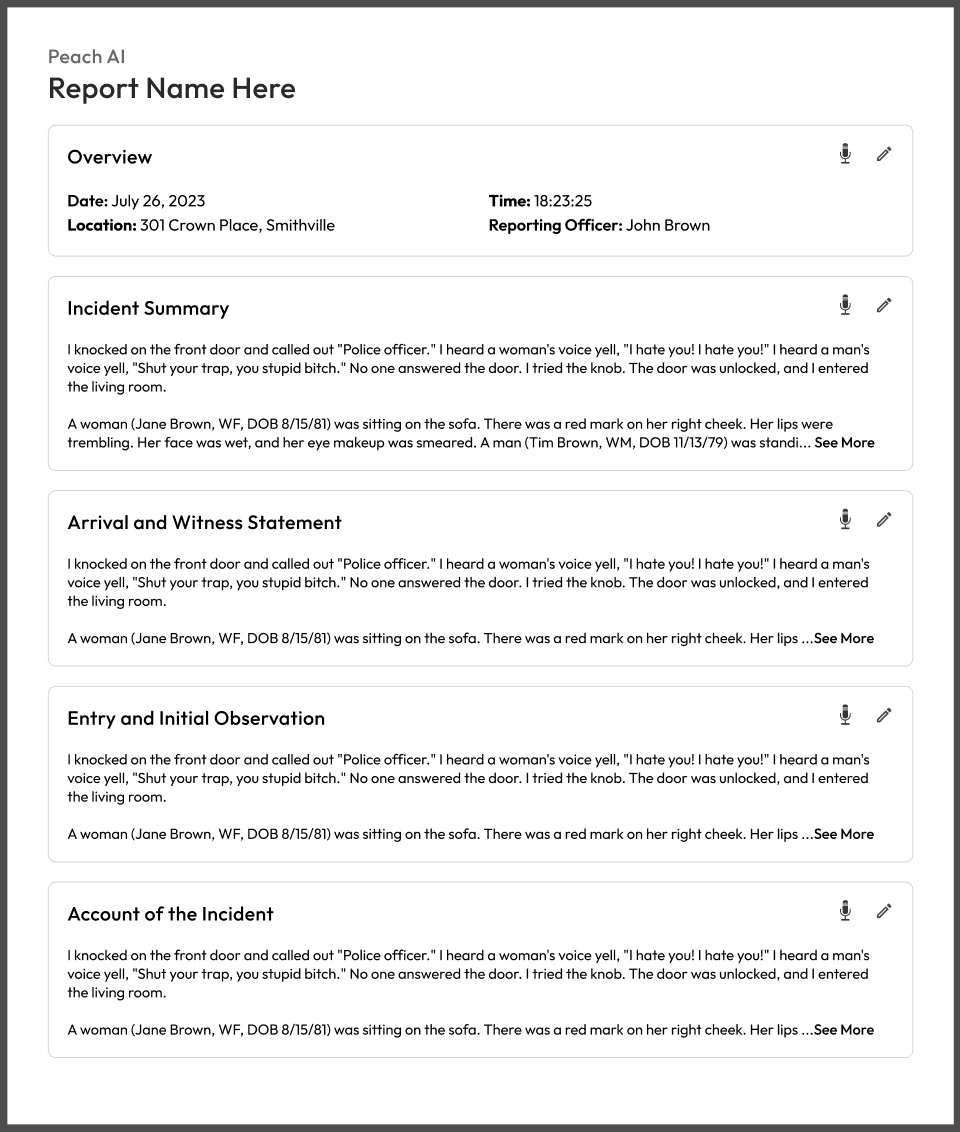
Structured Sections
Organizing long reports into recognizable information blocks.
Editable Content
Allowing officers to review and modify individual report sections.
Voice Input
Supporting an alternative way to provide reporting information.
Readable wasn't enough.
Officers needed control.
The section-based MVP made long reports easier to read. But feedback from officers exposed a gap between a well-organized draft and a report they could confidently finish and submit.
Easy to read, hard to submit
The segmented layout was clear, but it looked too different from the formats officers were expected to submit.
One format wasn't enough
Officers asked whether the same incident could be written in other report formats without starting over.
Corrections felt difficult
Officers worried about AI inaccuracies and missing details. The MVP did not appear flexible enough for the revisions they anticipated.
Read and edit sections
Our initial approach prioritized legibility through separate report sections. It helped officers navigate the draft, but did not make the full revision process feel intuitive.
Refine the report with AI
We evolved the interaction into a chat-based workflow. Officers could describe a correction, request missing details, or ask AI to revise the draft in natural language.
We initially designed for readability. Early feedback pushed us to design for real reporting workflows, flexible outputs, and user control.
Design direction informed by qualitative MVP feedback. Improvements in speed, accuracy, or usability are not claimed without validation data.
The problem was bigger than writing.
Feedback reframed our challenge: help officers revise AI-generated content with confidence, then reuse incident information across the different reports their work requires.
Different departments required different report formats, and a single incident could require multiple documents over time.
The MVP helped us move from an idea to a product experience — and revealed the next problem worth solving.
One Incident.
Multiple Reports.
Redesigning report management around incidents, not individual documents.
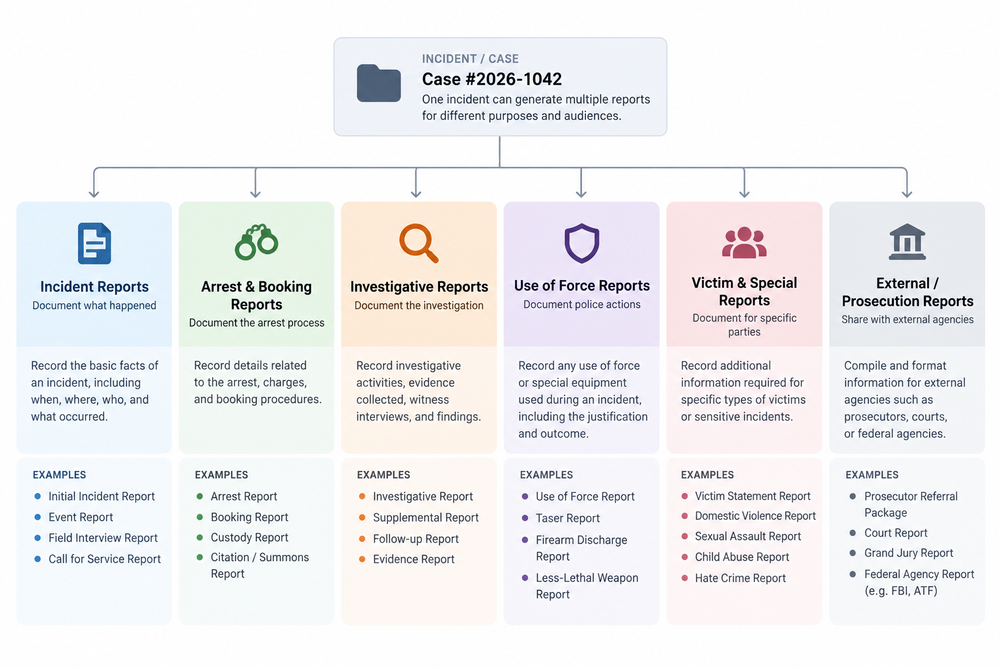
One incident can lead to many reports.
A single incident may require an internal report, prosecutor documentation, a court report, or an FBI report.
While these reports follow different formats, they are based on information from the same underlying incident.
Flat history.
Fragmented information.
As report templates were introduced, the existing flat history did not clearly show relationships between reports.
Related documents appear as separate entries.
Reports stay grouped under their parent incident.
How might we support multiple reporting formats without fragmenting incident information?
Make the incident the primary object.
Instead of organizing the experience around independent documents, we structured the history around incidents.
Organize around the incident. Reuse the information. Keep reports connected.
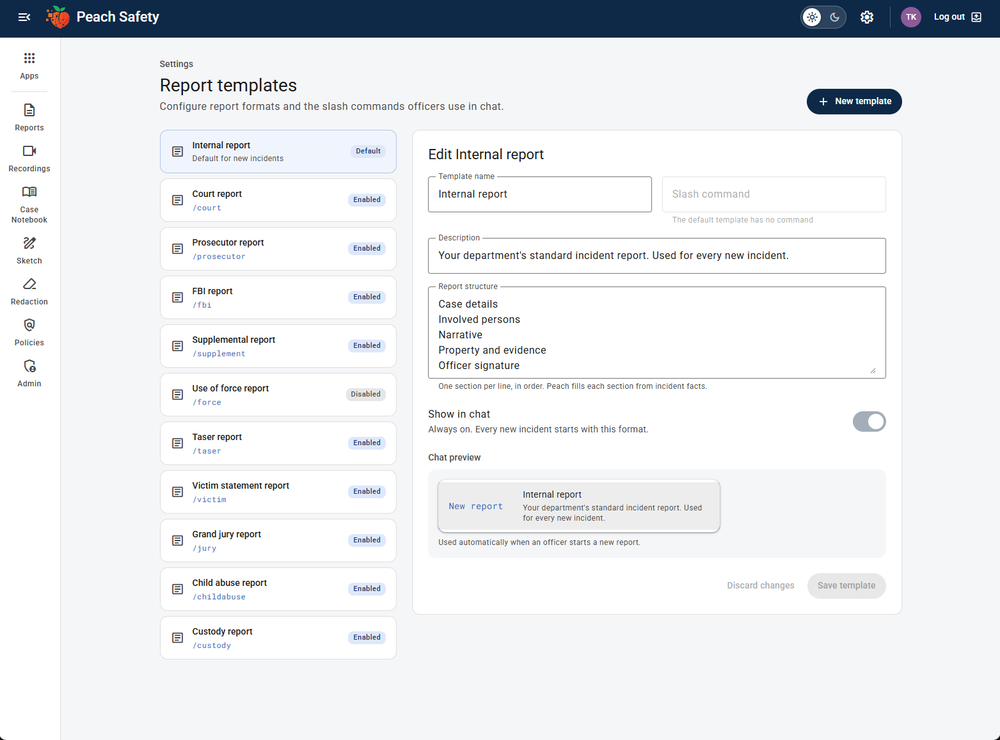
The same incident information can be reused across multiple report templates to meet first responders’ needs. Slash commands let officers instantly apply frequently used templates, skipping the repetitive steps of browsing, selecting, and generating reports.
A connected reporting system.
Expandable Incident Groups
Keep related reports together within a searchable history.
Multiple Report Types
Support different reporting formats for the same incident.
Shared Incident Information
Use existing incident details when generating another report.
Individual Report Status
Distinguish submitted reports from drafts within an incident.
Related reports. One place.
The final report history uses expandable incident groups with nested report entries, individual statuses, and an option to add another report.
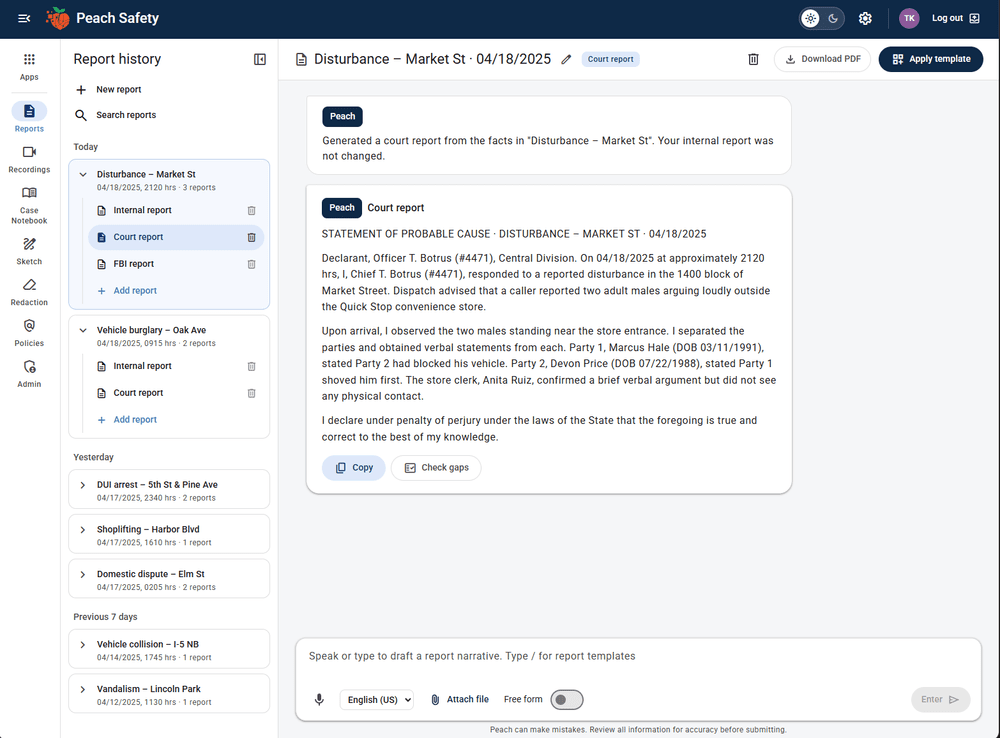
From disconnected documents to a connected reporting experience.
The new structure supports multiple reports within a single incident and makes related documentation easier to organize and revisit.
Beyond the
Document Editor.
Evolving report writing into a conversational AI workspace.
Designing beyond screens.
Building beyond the product.
Working on Peach Safety from its earliest stage gave me the opportunity to contribute across product design, business strategy, customer engagement, pricing, marketing, investor materials, and operations.
Across three years, I learned to connect user needs, operational complexity, and business goals — and to approach product design as part of building a sustainable business.